
XLSX operating system; Google Sheets compatibility is not claimed for this edition.
PET CARE BUSINESS OPERATING SYSTEM · V5 · AVAILABLE ON ETSY
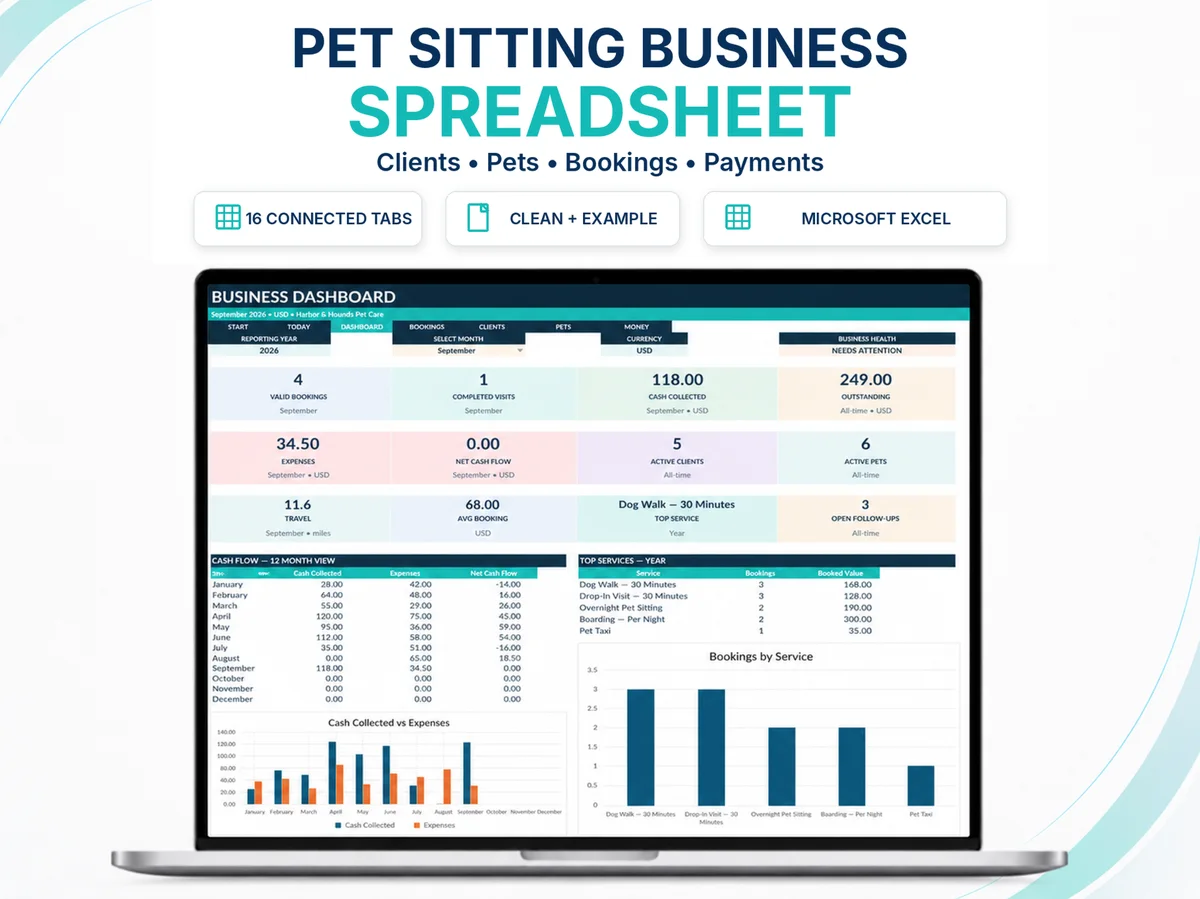
Pet Sitting Business Spreadsheet for Excel: 16-Tab Client, Booking & Payment System
A purpose-built pet care business spreadsheet for independent pet-care professionals who need clients, pets, services, bookings, payments, service records, expenses, mileage and management views to work together.
CURRENT ETSY OFFER30% OFF
US$29.99US$42.84
Taxes, VAT and local-currency pricing can vary by buyer location. Etsy shows the final current price.
FORMATMicrosoft Excel 365
Administrative business-management workbook.
REGIONAL READYUSD · GBP · EUR · CAD · AUD
dd-mmm-yyyy; miles or km.
WORKFLOWSET UP → BUILD → OPERATE → REVIEW
Records connect through the operating cycle.
SUPPORTDedicated Help Center
Setup, compatibility, use and troubleshooting.
PURCHASE & DELIVERY DETAILS
Know the format and scope before buying.
The live Etsy listing is the source of truth for current price, taxes, availability and checkout terms.
A clean operating file plus an example-data workflow reference.
30% off the US$42.84 base price. Taxes, VAT and local currency may vary by location.
Digital delivery and purchase access are handled by Etsy.
Do not resell, redistribute, sublicense, publicly upload or repackage the files unless the final listing expressly states otherwise.
Video tutorial, setup, compatibility and troubleshooting at sellerfuture.com/support/pet-care-business-operating-system/.
OPERATIONAL OUTCOMES
Make the work easier to see before it becomes a problem.
The system is designed to make records, status and management exceptions more visible; it does not guarantee business outcomes.
WHAT THE SYSTEM CONNECTS
One workflow from client record to management review.
The workbook is not a set of unrelated tabs. Its value comes from how records and decisions move through the operating chain.
CLIENT→PET→SERVICE→PRICE→BOOKING→PAYMENT→VISIT→FOLLOW-UP
START HERE
Orientation, workflow and setup sequence.
SETUP
Business settings, currency, distance unit and operating inputs.
TODAY
Daily command center for active work, next seven days, outstanding payments and overdue follow-ups.
DASHBOARD
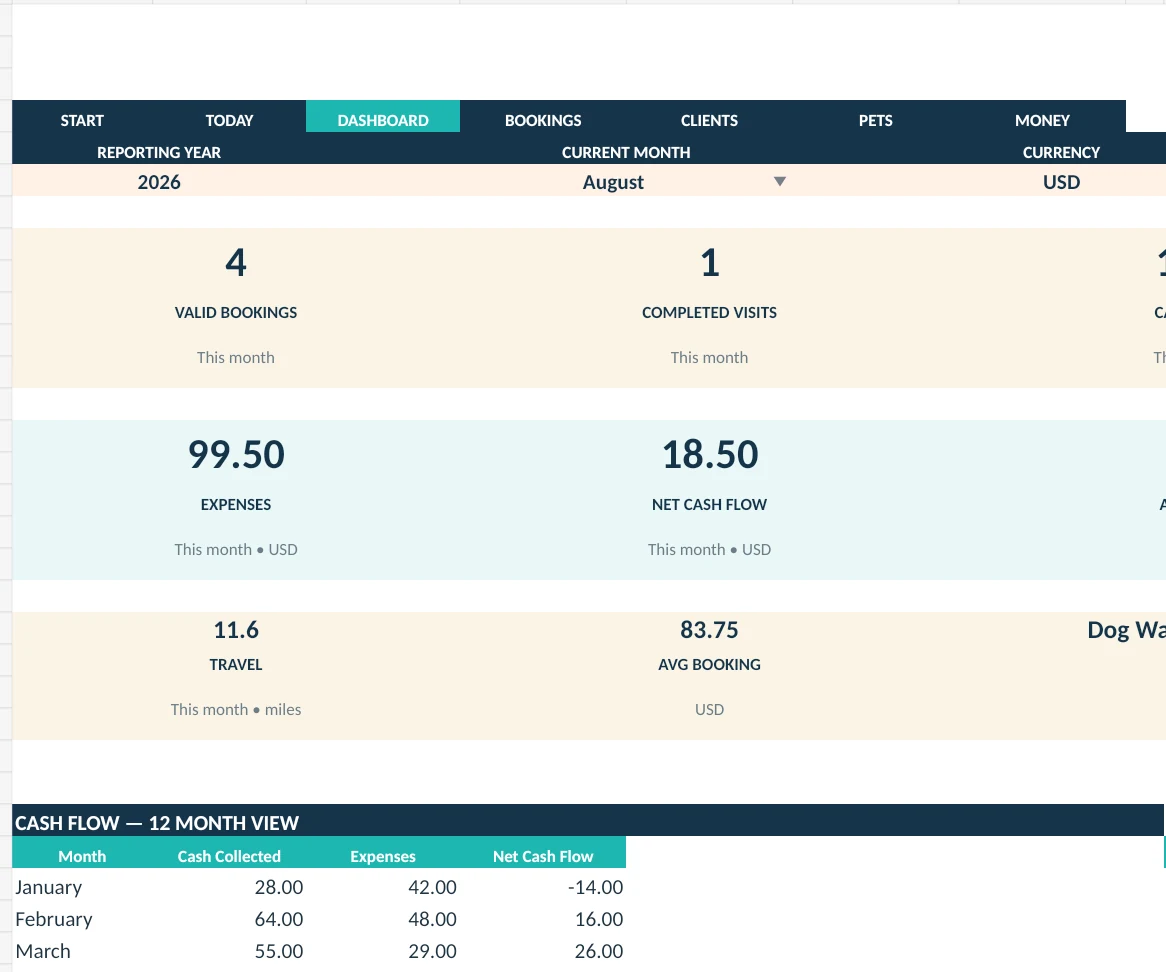
Management view for booking, visit, cash-flow and service signals.
CLIENT CRM
Client records with lifecycle and booking context.
PET DATABASE
Pet profiles, care context and linked client records.
SERVICES
Controlled service catalog.
PRICING HISTORY
Rate history and effective-date visibility.
BOOKINGS
Booking records, dates, status, client/pet/service and financial context.
RECURRING SCHEDULES
Planning register for recurring demand; not automatic booking generation.
SERVICE LOG
Evidence of completed service activity.
PAYMENT TRANSACTIONS
Payments and refunds.
EXPENSES
Administrative expense records.
MILEAGE
Travel/distance records.
FOLLOW-UPS
Visible next actions and due dates.
REPORTS
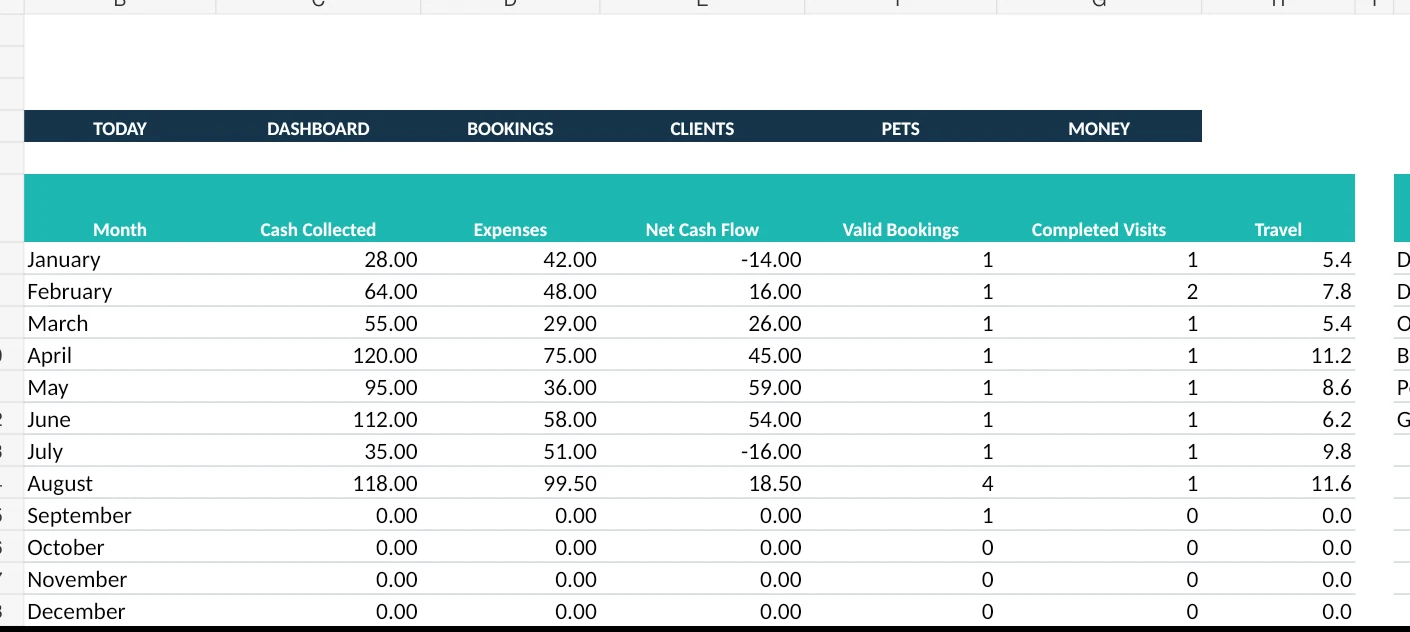
Management reporting views.
SEE THE SYSTEM IN USE
Watch the complete Excel workflow before you buy.
The official SellerFuture tutorial walks through setup and the connected operating workflow so you can inspect how the system is intended to work before committing to it.
- 8 min 24 sec guided walkthrough.
- English subtitles available on YouTube.
- Privacy-enhanced player loads only when you press Play.
- Permanent written documentation remains available after purchase.
Open on YouTubePrivacy-enhanced player: YouTube is not loaded until you press Play.
REAL WORKBOOK VIEWS
Inspect the product, not a fictional mockup.
Examples below use the real V5 workbook with example data. Excel interface chrome is cropped for presentation; the underlying workbook view is not redrawn.
DASHBOARD · EXAMPLE DATA
BOOKINGS · EXAMPLE DATA

CLIENT CRM · REAL WORKBOOK STRUCTURE

REPORTS · EXAMPLE DATA
FIT & LIMITS
Choose the system for the operation you actually have.
Clear limitations reduce buyer regret and help the right customer understand the product quickly.
Good fit when…
- You are a solo or small independent pet-care operator.
- You want stronger records and management visibility in Excel.
- You prefer a one-time workbook system over another SaaS subscription.
- You are comfortable entering and maintaining business records.
- You need a system for operations, not a client-facing booking app.
Dedicated software may be better when…
- You need multi-provider dispatch or staff mobile apps.
- You need automated client portals, messaging or online booking.
- You need complex payroll, invoicing automation or integrations.
- Your volume exceeds the practical preconfigured workbook structure.
- You need regulated accounting/tax software rather than management records.
Compatibility: this V5 release is positioned for Microsoft Excel 365. SellerFuture does not claim Google Sheets compatibility merely because an XLSX file can be imported.
PRECONFIGURED WORKING CAPACITY
Enough structure for real use without pretending Excel is infinite.
The workbook is preconfigured for a solo or small pet-care business. Capacity is a practical design choice, not a claim that the file replaces enterprise software.
Clients
Client CRM rows preconfigured for routine use.
Pets
Pet profiles linked to client records.
Services
Service catalog capacity.
Bookings
Booking records.
Transactions
Payment/refund transactions.
Service logs
Service-delivery records.
Expenses
Expense records.
Travel records
Mileage/travel records.
EXACTLY WHAT YOU RECEIVE
Product files and implementation support
- CLEAN workbook for your business records.
- EXAMPLE workbook showing how the system behaves with sample data.
- Permanent product documentation at sellerfuture.com/support/pet-care-business-operating-system/.
- Permanent web support route: sellerfuture.com/support
Administrative scope
The workbook is an administrative business-management template. It does not provide legal, accounting, tax, veterinary or financial advice. Professional and regulatory requirements vary by location and business model.
Recurring schedules
The Recurring Schedules worksheet is a planning register. It does not automatically generate future Bookings records. Confirmed service should still be represented in the operational booking workflow according to the workbook documentation.
FAQ
Before you choose the workbook
Is there a Google Sheets version?
A separate Google Sheets edition is in development. This Excel release does not support Google Sheets, and no Google Sheets purchase link will appear until the separate edition has passed native testing.
Does it automatically create bookings from recurring schedules?
No. Recurring Schedules is a planning register, not an automatic booking generator. This is stated intentionally so the product is not oversold.
Is it accounting or tax software?
No. It records management data such as payments, refunds, expenses and mileage/travel. Formal accounting and tax treatment depends on the user’s jurisdiction and professional advice.
Can a team use it?
The workbook is designed primarily for solo and small pet-care operations. Larger teams may need dedicated software for assignment, permissions, portals and automation.
Where do buyers get support?
General documentation is at sellerfuture.com/support. For order-specific assistance, Etsy buyers should open the purchase in Etsy and use the order’s contact-seller route so the purchase context stays attached.
NEED A MORE SPECIALIZED PET-SITTING WORKFLOW?
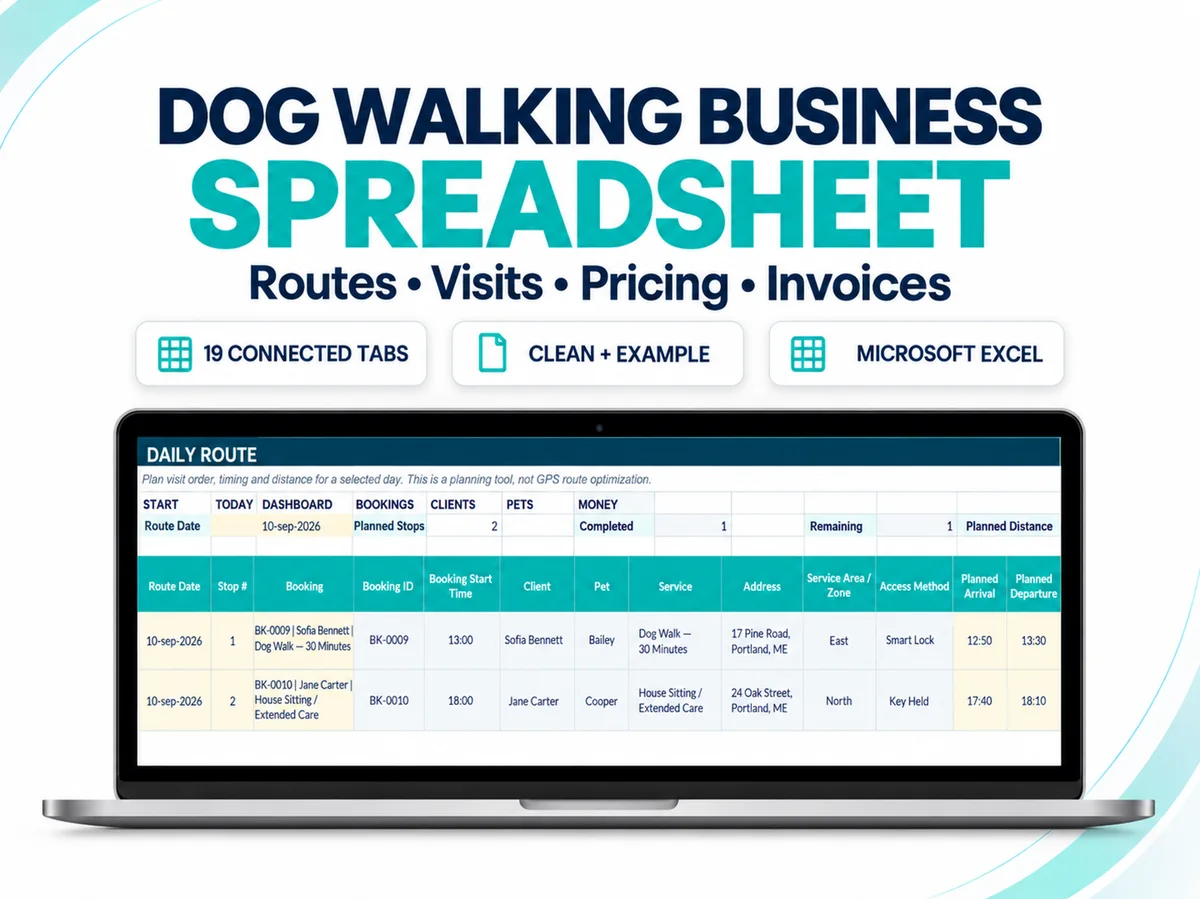
Compare the 19-sheet Dog Walking Business Spreadsheet.
The current V5 remains the broader Pet Sitting Business Spreadsheet for Excel. The specialist system adds a workflow built specifically around pet sitting and dog walking, including pricing calculator, daily route, visit log, invoice and dedicated reporting structure.
NEED REUSABLE CLIENT + SERVICE DOCUMENTATION?
Add the 24-form PDF toolkit without replacing your operating spreadsheet.
Use the Forms Toolkit for fillable client, pet, booking, visit, incident, invoice, log and schedule documents. Use the Excel system for connected management records and reporting.
24 unique forms48 PDFs totalA4 + US Letter

READY TO PUT THE SYSTEM TO WORK?
Choose the product that solves the next operational problem.
Shop the live SellerFuture catalog on Etsy, or compare the systems and forms before checkout.